Meetings
A meeting in Libera Space knows who is invited, which documents to read, what was decided, and where to meet.
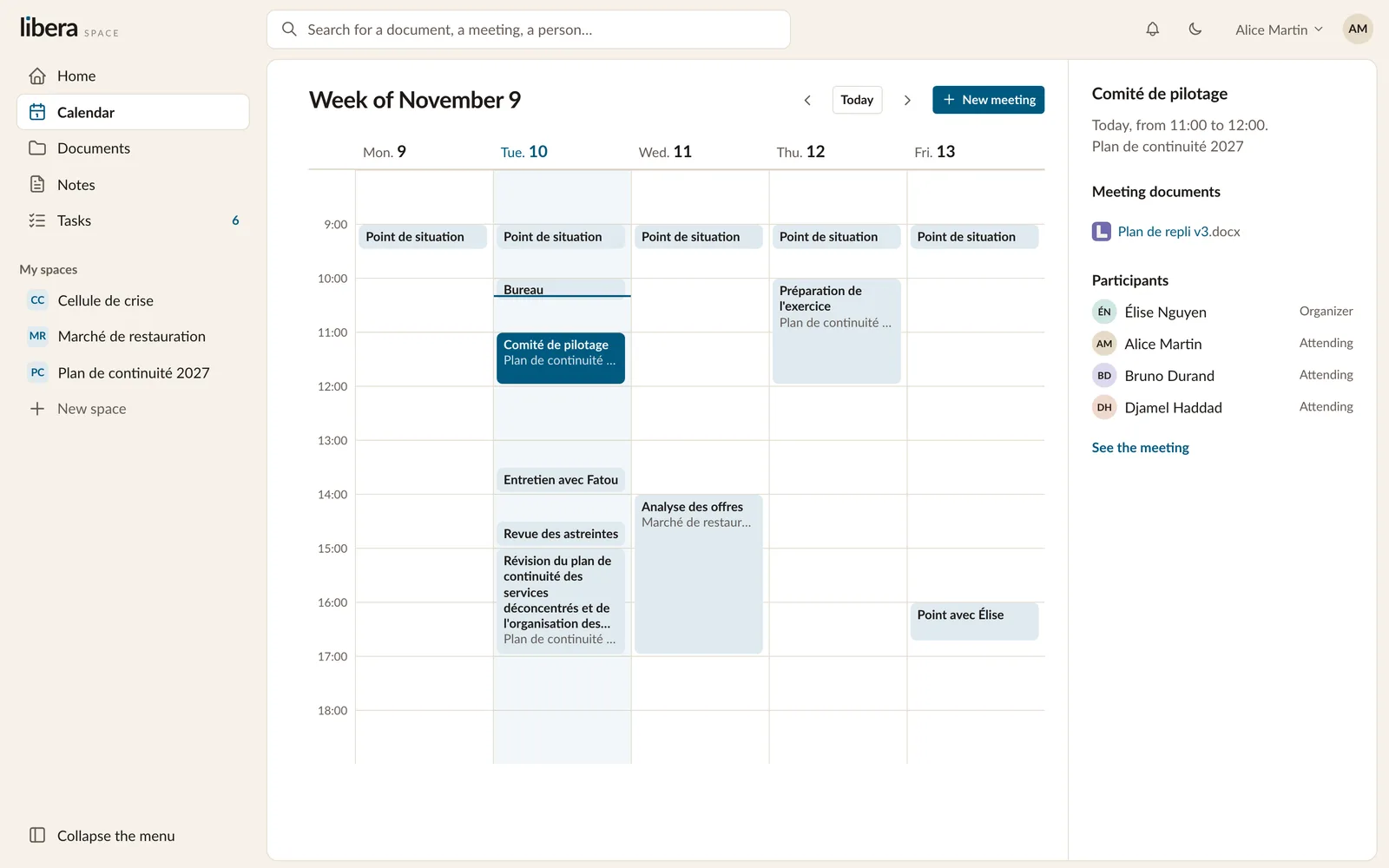
The calendar
Calendar shows your day, your week or your month: every meeting you are in, from all your spaces. Select one to see its documents and who is coming. On a phone, it opens on today's list.
Above it, a row of calendars to show or hide, each in its colour: yours, those colleagues share with you, and your spaces'. You can also add a colleague's busy times, to see when they are taken without seeing what. The choice is kept on each device.
Planning a meeting
A new meeting belongs to a space, or to its participants alone. Once you choose the people, Libera Space suggests times when they are all free, within the working day and away from public holidays. When you look at others' calendars to find a time, you see when they are busy, and nothing more.
A meeting can come back on working days, every week or every two weeks, every month on the same date or the same weekday, or every year, until a date or for good. Change one occurrence, this one and the ones after, or the whole series.
In a space, a meeting can be for all its members: someone who joins the space later is in the meetings still to come.
People from outside. Type their addresses and the invitation leaves from your own mailbox, as any calendar app would send it. Their answers come back there, and Libera Space reads them: you see who is coming. If the meeting moves or is called off, they are told the same way.
Private. A meeting outside a space can be private: to those you share your calendar with, it shows only as "Busy", with its time and nothing else.
Answering
The invitation reaches each participant, who answers whether they will attend. If a meeting moves, those invited hear of it, and their answers start again.
Invitations from outside, sent by another organisation's calendar app, come by mail as usual. Libera Space puts them in your calendar, and the message shows a card with the meeting and what else you have then. Answer from the card or the calendar: your answer goes back by mail. If the organiser moves the meeting or calls it off, your calendar follows.
Sharing your calendar
Everyone sees when you are busy, so that they can suggest a time. Beyond that, under Share my calendar, you choose who also sees your meetings, and at which level:
- Sees your meetings: their title and place appear in that person's calendar, in your colour.
- Organizes and answers for you: a delegate, such as an assistant. They plan meetings in your name, change them, and answer your invitations. You are told each time, others see that they acted for you, and mail to people from outside leaves your mailbox "on behalf of" them.
A private meeting stays yours alone, whatever the level.
Rooms and equipment
A space's managers list the rooms and equipment it lends, with their seats and a description, for the space's members or for everyone. A space for general services can hold the whole building's rooms.
Book one by adding it to a meeting. It answers by itself: booked if it is free every time the meeting is held, declined if not, with the date it is already taken. The form shows when it is free, beside the people.
In a space
A space's Meetings page lists those to come and those past, or shows them by week or by month. It also gives an address to follow them in a calendar app.
In your phone or calendar app
Your account page gives your calendar a secret address. Subscribe to it from an iPhone, a Mac, Android, Thunderbird, Outlook or Google Calendar, and your meetings appear there, kept up to date. Each space you are in has an address of its own, made from yours. Keep them to yourself, and change yours if it has been passed around: the old one stops working.
These apps read your calendar and cannot change it: plan and change meetings in Libera Space. Changing them from a phone or Thunderbird will come with Libera Space's own calendar server.
Before, during, after
Before: attach the documents to read: they open from the meeting.
During: a button to join the meeting appears on everyone's home page a few minutes before it starts. Meetings can open in Visio, the State's video service, and Libera Meet will bring video meetings into Libera Space itself.
After: start the minutes as a note, already holding who was there. They stay attached to the meeting.